
连接 / 連線 / Connect
添加、编辑和删除 SMB / WebDAV 连接;局域网内可发现 SMB 设备。 / 添加、編輯和刪除 SMB / WebDAV 連線;區域網絡內可發現 SMB 裝置。 / Add, edit, and remove SMB or WebDAV connections, and discover SMB devices on the local network.
NFM / NAS 文件管理器 / NFM / NAS 檔案管理器 / NFM / NAS File Manager
通过 SMB 或 WebDAV 浏览、管理你的 NAS 文件,预览照片、视频和文档。也能不连接 NAS,直接压缩本地视频。 / 透過 SMB 或 WebDAV 瀏覽、管理你的 NAS 檔案,預覽相片、影片及文件。亦可無需連接 NAS,直接壓縮本機影片。 / Browse and manage your NAS via SMB or WebDAV. Preview photos, videos and documents, or compress local videos without a NAS connection.
无需注册 NFM 账号,连接由设备直达 NAS。 / 無需註冊 NFM 帳戶,連線由裝置直達 NAS。 / No NFM account is required. Your device connects directly to the NAS.

文件管理 / 檔案管理 / File management
支持 SMB 和 WebDAV,适配手机与平板的日常 NAS 文件操作。 / 支援 SMB 和 WebDAV,適配手機與平板的日常 NAS 檔案操作。 / SMB and WebDAV support for everyday NAS file operations on phones and tablets.
添加、编辑和删除 SMB / WebDAV 连接;局域网内可发现 SMB 设备。 / 添加、編輯和刪除 SMB / WebDAV 連線;區域網絡內可發現 SMB 裝置。 / Add, edit, and remove SMB or WebDAV connections, and discover SMB devices on the local network.
目录浏览、名称搜索、列表 / 网格视图、排序、收藏和常见文件预览。 / 目錄瀏覽、名稱搜尋、列表 / 網格視圖、排序、收藏和常見檔案預覽。 / Browse folders, search by name, switch list or grid views, sort, save favorites, and preview common files.
在“任务”查看上传、下载、普通文件复制及本地压缩进度;适用任务支持暂停、继续、重试或取消。 / 在「工作項目」查看上傳、下載、一般檔案複製及本機壓縮進度;適用項目支援暫停、繼續、重試或取消。 / Track uploads, downloads, regular-file copies and local compression in Tasks. Eligible tasks support pause, resume, retry or cancellation.
图片、音频、视频和常见 Office / PDF 文件可在设备上预览或交给其他应用打开。 / 圖片、音頻、影片和常見 Office / PDF 檔案可在裝置上預覽或交給其他應用打開。 / Preview images, audio, video, and common Office or PDF files on the device, or open them in another app.
NFM 1.0.5 / NFM 1.0.5 / NFM 1.0.5

列表或网格浏览,收藏常用目录,搜索当前目录或子目录。支持普通文件的同连接复制与移动。 / 以列表或網格瀏覽,收藏常用資料夾,搜尋目前或下層資料夾。支援一般檔案於同一連線內複製與移動。 / Browse in list or grid view, bookmark folders and search subfolders. Copy and move regular files within the same connection.
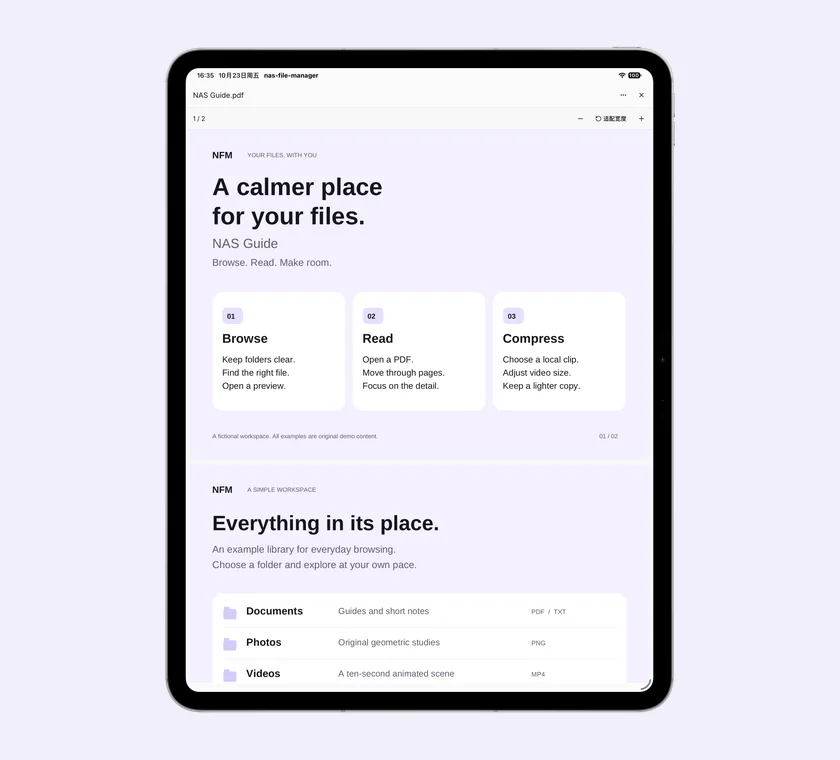
连续阅读 PDF,适配宽度或放大细看;也支持常见 Office 和纯文本预览。超出预览能力时,可用其他应用打开。 / 連續閱讀 PDF,適配寬度或放大細看;亦支援常見 Office 及純文字預覽。超出預覽能力時,可用其他應用程式開啟。 / Read PDFs continuously, fit the page width or zoom in. Preview common Office and plain-text files, or open them in another app.
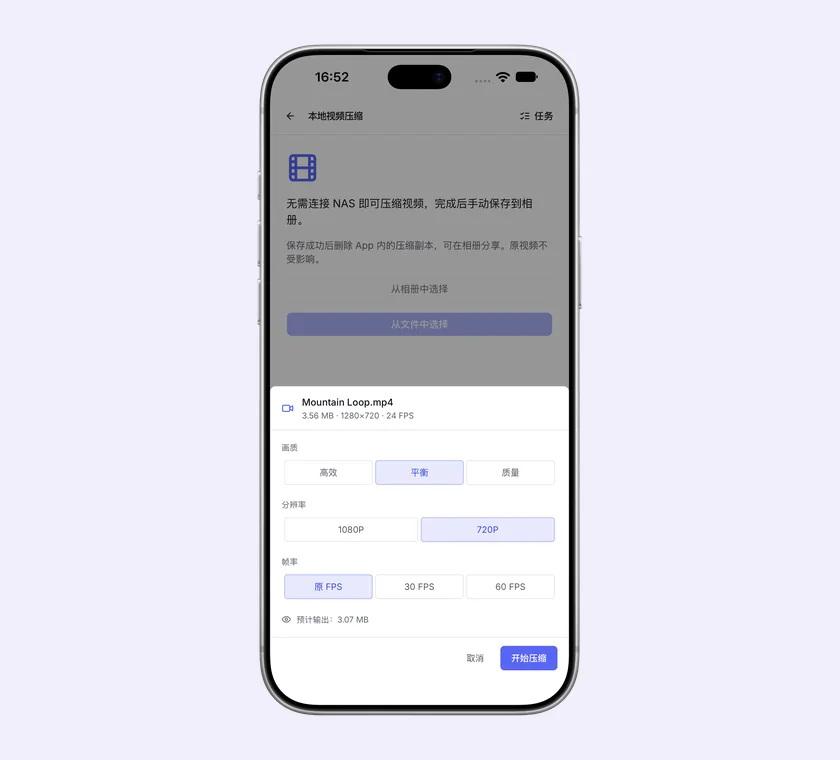
从相册或文件选择视频,在设备本地压缩,再手动保存到相册。原视频保留,结果可在“任务”找回。 / 從相簿或檔案選擇影片,在裝置本機壓縮,再手動儲存至相簿。原影片保留,結果可在「工作項目」找回。 / Choose a video from Photos or Files, compress it on your device and save it to Photos. Keep the original and find results in Tasks.
当前支持 iOS 15+、Android 7.0+;Android APK 仅 arm64-v8a。不支持文件夹、跨 NAS 或跨 SMB 共享的复制与移动。 / 目前支援 iOS 15+、Android 7.0+;Android APK 僅限 arm64-v8a。不支援資料夾、跨 NAS 或跨 SMB 共用的複製與移動。 / Requires iOS 15+ or Android 7.0+. The Android APK is arm64-v8a only. Folder copies or moves, cross-NAS operations and operations between SMB shares are not supported.
直连工作流 / 直連工作流 / A direct workflow
NAS、账号和文件权限保持原有设置,NFM 直接连接并管理其中的文件。 / NAS、帳戶和檔案權限保持原有設定,NFM 直接連線並管理其中的檔案。 / Your NAS, accounts, and permissions stay as configured. NFM connects directly to manage the files there.
填写 SMB 共享路径或 WebDAV URL,按需选择记住密码。 / 填寫 SMB 共用路徑或 WebDAV URL,按需選擇記住密碼。 / Enter an SMB share path or WebDAV URL, and choose whether to remember the password.
在 NAS 目录中搜索、预览、上传、下载、重命名和整理文件。 / 在 NAS 目錄中搜尋、預覽、上載、下載、重新命名和整理檔案。 / Search, preview, upload, download, rename, and organize files in NAS folders.
从首页或侧栏进入“任务”,查看传输进度及本地压缩结果。后台执行受系统限制。 / 從首頁或側邊欄進入「工作項目」,查看傳輸進度及本機壓縮結果。背景執行受系統限制。 / Open Tasks from Home or the sidebar to find transfer progress and local compression results. Background work is subject to system limits.
无需注册 NFM 账号;文件不经过 NFM 服务器,诊断信息只在你主动导出时分享。 / 無需註冊 NFM 帳戶;檔案不經過 NFM 伺服器,診斷資訊只在你主動匯出時分享。 / No NFM account is required. Files do not pass through an NFM server, and diagnostics are shared only when you export them.
继续阅读 / 繼續閱讀 / Read the details
连接、凭据、HTTP WebDAV、传输恢复、缓存、诊断、分享、压缩与删除数据。 / 連線、憑據、HTTP WebDAV、傳輸恢復、快取、診斷、分享、壓縮與刪除資料。 / Help with connections, credentials, HTTP WebDAV, transfer recovery, cache, diagnostics, sharing, compression, and data deletion.
隐私政策 → / 隱私政策 → / Privacy Policy →查看连接信息、凭据、缓存、诊断和系统权限如何使用。 / 查看連線資訊、憑據、快取、診斷和系統權限如何使用。 / Learn how connection details, credentials, cache, diagnostics, and system permissions are used.
用户协议 → / 使用者協議 → / User Agreement →查看使用许可、网络安全、文件备份和预览限制等条款。 / 查看使用許可、網絡安全、檔案備份和預覽限制等條款。 / Review license, network security, file backup, and preview limitation terms.